
Sharing your server with friends (subusers)
What this is about
DraftWant a friend or co-admin to be able to restart the server, edit configs or
install mods? Don't share your password. Add them as a subuser
instead. They log in with their own account and can only do what you allow,
and you can remove them at any time.
Adding a subuser
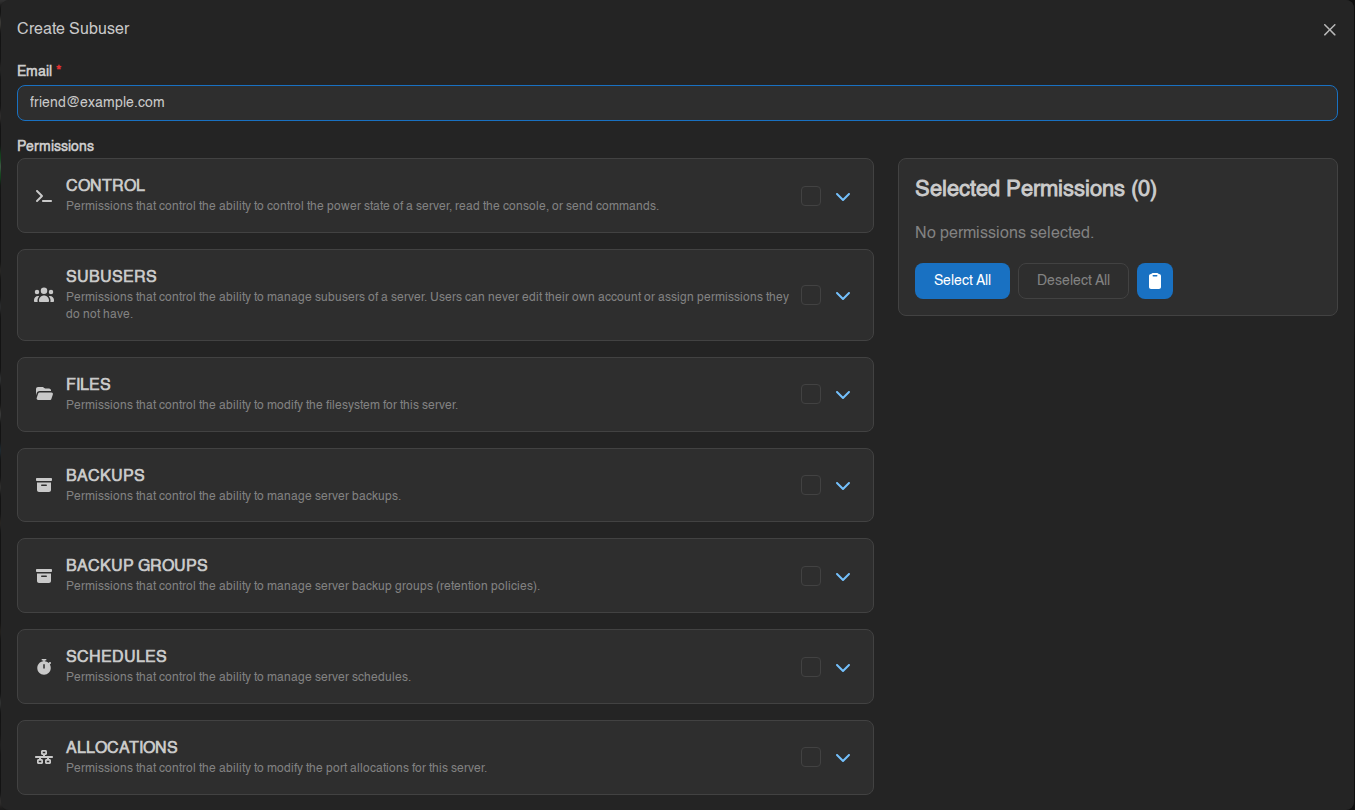
If they already have a panel account with that email, the server appears on their dashboard straight away.
If they don't, the panel creates an account for them and emails them a link to set a password. Ask them to check their spam folder if it doesn't arrive within a few minutes.
You can add up to 25 subusers per server.
Choosing permissions
Permissions are grouped by section of the panel: CONTROL, SUBUSERS, FILES, BACKUPS, SCHEDULES, STARTUP, SETTINGS and so on. Tick a group's box to give everything in it, or click the ⌄ arrow to pick individual permissions. The Selected Permissions box on the right shows what you've picked so far.
Give people only what they need. You can always add more later.
A few permissions effectively give full control: Files → update/delete (they can change or remove anything), Backups → restore/delete, Startup, and Settings → reinstall. Only give these to people you trust with your whole server.
A sensible "trusted helper" set
Control (all), Files (all except delete), Backups (create, read), Schedules (read), Activity (read).
A "can only restart it" set
Control → read console, start, stop, restart. That's it.
Hiding files from a subuser
Ignored Files lets you hide files and folders from a subuser completely,
in progress.the file manager and over SFTP. Enter one pattern per line, for example:
secrets/
*.env
config/discord-bot.json
A pattern starting with ! un-hides something a broader pattern hid.
Changing or removing a subuser
On the Subusers tab, click the subuser to change their permissions, or use Remove to take away their access. Removing a subuser doesn't delete their panel account, only their access to this server.
The 2FA Enabled column shows whether each subuser protects their account with two-factor authentication. For anyone with powerful permissions, ask them to turn it on.
Seeing what subusers did
The Activity tab logs actions on your server (power actions, file edits, backups and so on) along with who did them. If something changed and you don't know why, check there first.
For the subuser: where's the server?
Once you've been added, the server shows up on your dashboard when you log in to the panel, alongside any servers you own. You'll only see the tabs and buttons your permissions allow.