
My server won't start or keeps crashing
What this is about
DraftYour uploadserver is stuck on Starting, goes straight back to Offline, or
crashes after running for a while. This guide walks through the usual causes
in progress.the order we check them ourselves. Most problems can be fixed without
opening a ticket.
Step 1: Read the console
Go to the Console tab and start the server. The answer is almost always in the last 20–30 lines before it stops.
Lines from the panel itself start with container@calagopus~. Everything else
comes from the game. Look for words like ERROR, Exception,
FATAL or Caused by.
When the server crashes, the panel prints a block like this:
container@calagopus~ ---------- Detected server process in a crashed state! ----------
container@calagopus~ Exit code: 137
container@calagopus~ Out of memory: true
The Out of memory line is the most useful clue. Jump to Out of memory below if it says true.
Step 2: Match what you see
"Out of memory: true" (or exit code 137)
Your server used all the RAM your plan allows and was stopped.
You can watch memory use live on the Console tab's resource graphs.
"Disk space is full, cannot start the server" / "Server is exceeding the assigned disk space limit"
You're out of storage. The server won't start until you free some up.
"Aborting automatic restart, last crash occurred less than … seconds ago"
The server crashed twice in quick succession, so the panel stopped restarting it to avoid a crash loop. Fix the underlying crash (the lines above this message), then start the server manually.
Stuck on "Starting" forever
The game process is running but the panel never saw the line that means ready.
Starts, then stops after a few seconds with no clear error
Most often a broken config file or a bad mod.
Vintage Story: the console often names the mod that failed. Remove it from the Mod Browser → Installed tab and try again. If the panel shows a Missing mod dependencies banner, install the listed mods first.
"Address already in use" / "Failed to bind to port"
Your game config is set to a port that isn't yours. Go to the Network tab to see your assigned ports, and make sure your game's config uses the primary one. Most games read it from the Startup tab automatically; remove any port you hard-coded in config files.
Server installed wrong or is badly broken
Settings → Reinstall Server re-runs the original setup.
Take a backup first. Reinstalling can delete or overwrite files. If you switch on "delete all files of this server", it wipes everything.
Step 3: The server crashes, but only sometimes
Step 4: Still stuck? Open a ticket
Include these so we can help quickly:
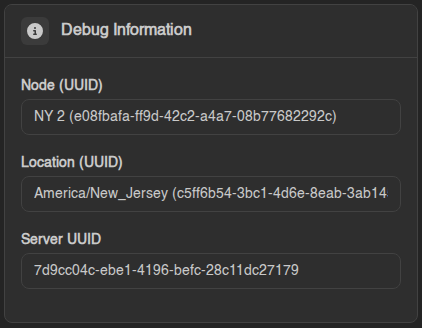
You don't need to send your password or any files. We can see your server from our side.