Getting help: support tickets
Opening a ticket
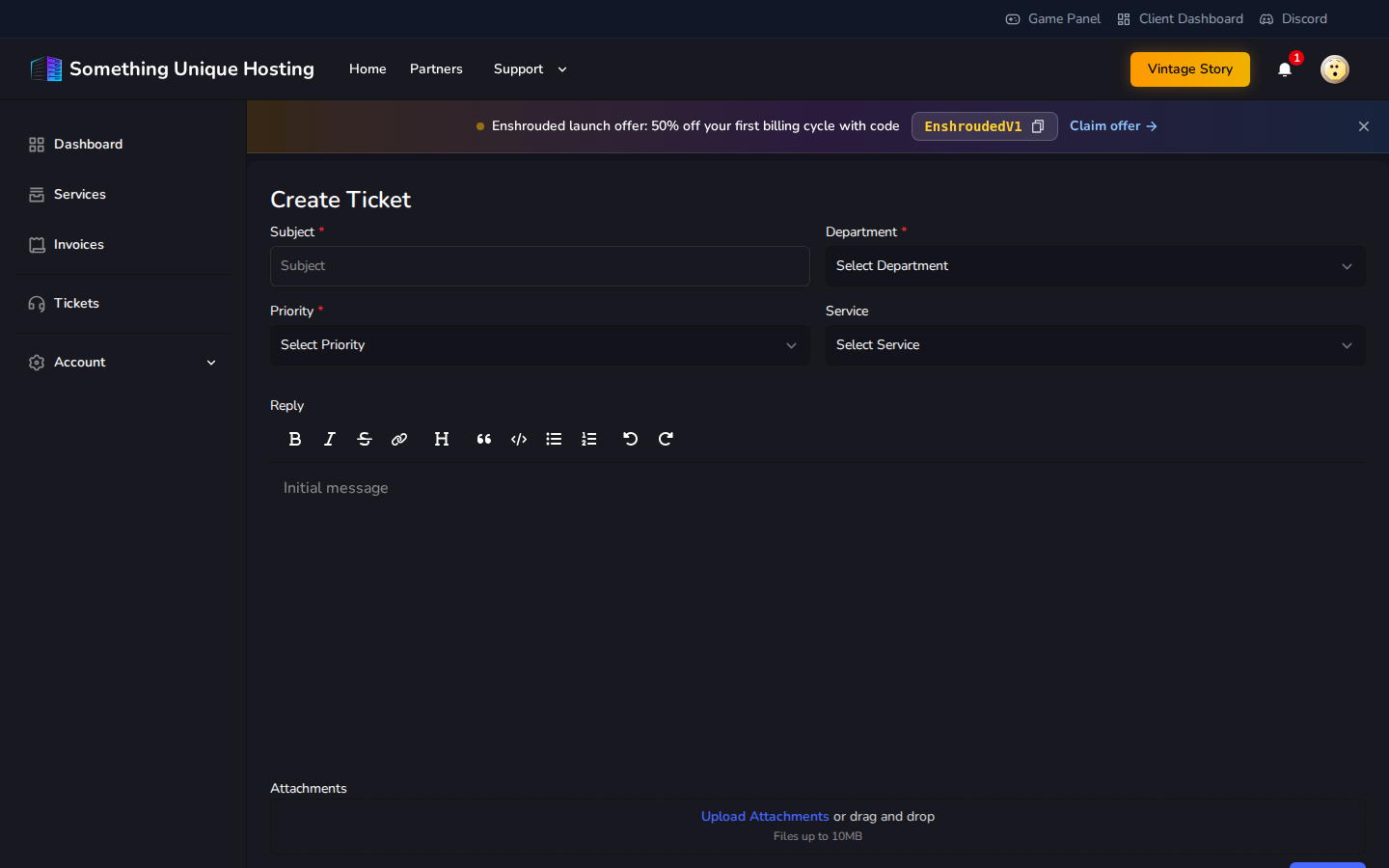
Click Tickets in the menu (or Support → Support at the top), then create a new ticket.
Fill in:
Subject: a short summary, e.g. "Server won't start after update"
Department: Support for technical problems, Sales for billing, refunds and plan questions
Priority: Low, Medium or High
Service: the server it's about, if any
Your message, plus any screenshots or log files (up to 10 MB each)
Click Create.
Coming soon.
Get a faster answer
Include:
What happened and what you expected
When it started, and anything you changed just before (mods, updates, settings)
For game server problems: the Debug Information from the server's Settings tab in the game panel, and the last lines of the console (see My server won't start or keeps crashing)
Never send us your password.
Replies and closing
You'll get an email when we reply. Answer on the ticket page with Reply.
Problem solved? Click Close Ticket.
Tickets waiting for your reply close automatically after 7 days without a response. Tickets waiting on us never auto-close.
Other places to get help
Knowledgebase: you're here!
Server Status: check if there's a known outage.
Discord: chat with us and the community.