On a brand new server the list is empty and shows No players to show. That is normal: players appear once they have joined, or once you add them to the whitelist.
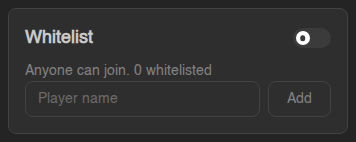
## Online now The **Online now** card shows how many players are on the server and how many slots it has (**of N slots** comes from `max-players` in `server.properties`). While the server is off it says **The server is offline.** When the server is running, the panel asks the server itself for the player list. The small line under the bar tells you how it got the answer: - **Read with the server list ping.** The same information the in-game server list shows. Only some servers name every online player this way. - **Read with the query protocol.** The full list of names. This needs `enable-query=true` in `server.properties`. If the panel can count the players but not name all of them, a yellow notice appears at the top of the list with a **Turn on query** button. Clicking it sets `enable-query=true` and the matching `query.port` in `server.properties` for you. **Restart the server** afterwards to apply it. ## Whitelist A whitelist means **only the players you list can join**. The **Whitelist** card has two parts:
1. The **switch** in the corner turns the whitelist on or off for the whole
server. The text below tells you the current state: **Only whitelisted
players can join** or **Anyone can join**, plus how many names are on it.
While the server runs this sends `whitelist on` / `whitelist off`; while it
is off, the panel changes `white-list` in `server.properties` instead.
2. To add someone, type their **Player name** and click **Add**. You get a
green **… added to the whitelist** message and the player appears in the
list with a **Whitelisted** badge.
Names are checked against Mojang when the server is off (on a normal online-mode=true server). If you see no Minecraft account has that name, check the spelling: the name has to be the player's exact Minecraft account name. Names can only contain letters, numbers, underscores and dots.
A player who has been whitelisted, opped or banned but never joined has no saved data yet. Their page says No saved data for this player yet and only shows the Control card. The stats and inventory appear after they have played and the server has saved.
## The Control card On the right of a player's page is the **Control** card. This is where you manage the player.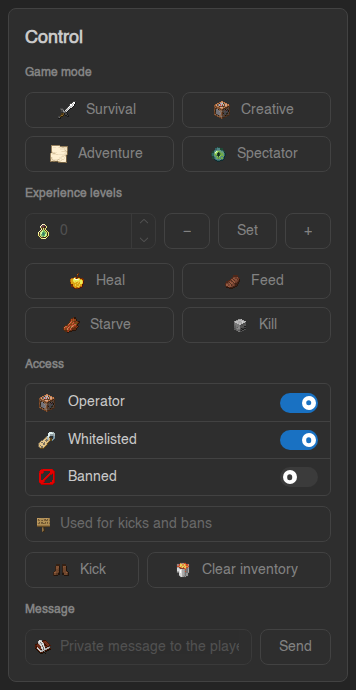 ### Access: Operator, Whitelisted, Banned
The three switches under **Access** give or take away access:
| Switch | What it does |
|---|---|
| **Operator** | Makes the player an operator (full admin rights in game, OP level 4). Only give this to people you trust. |
| **Whitelisted** | Adds or removes them from the whitelist. |
| **Banned** | Bans them from the server, or lifts the ban. Type a reason in the **Used for kicks and bans** field first if you want one; otherwise the reason is "Banned by an operator." A ban from here never expires. |
These three work **whether the server is on or off**. When it runs, the panel
sends the normal `op`, `whitelist`, `ban` and `pardon` commands. When it is
off, the panel edits `ops.json`, `whitelist.json` and `banned-players.json`
directly, so the change is there the next time you start.
### Kick
**Kick** removes the player from the server right now, with the text in the
**Used for kicks and bans** field as the reason. They can join again
immediately. This only works while the player is **online**.
### Game mode, experience, heal, feed, starve, kill, clear inventory
- **Survival / Creative / Adventure / Spectator** sets the player's game mode.
- **Experience levels**: type a number and click **Set** to set their level, or
use **−** and **+** to take away or add that many levels.
- **Heal** fills their health, **Feed** fills their food bar.
- **Starve** empties their food bar and **Kill** kills them.
- **Clear inventory** removes everything they carry. You are asked to confirm,
because this cannot be undone.
When the player is online, these run as game commands and happen immediately.
Game mode, experience, heal, feed and clear inventory also work while the
player is **offline**: the panel then writes the change into their saved player
data, and they see it when they next join. **Starve** and **Kill** need the
player online, so they are greyed out otherwise.
### Message
Type a **Private message to the player** and click **Send**. It uses the
in-game `tell` command, so the player has to be online.
## What needs the server running?
| Action | Server off | Server on, player offline | Player online |
|---|---|---|---|
| Whitelist on/off, add or remove a player | Yes | Yes | Yes |
| Operator on/off | Yes | Yes | Yes |
| Ban / unban | Yes | Yes | Yes |
| Game mode, experience, heal, feed, clear inventory | Yes (needs saved data) | Yes (needs saved data) | Yes |
| Kick, kill, starve, message | No | No | Yes |
| Save now | No | Yes | Yes |
"Needs saved data" means the player has to have joined at least once. For a
player who never joined, you get **this player has no saved data yet**.
## Common questions
**A row says "Unknown player".** The panel found saved data for a UUID but no
name for it (the server keeps names in `usercache.json`). The player's name
fills in the next time they join. Until then no command can target them.
**I whitelisted someone, but they still can't join.** Check that the
**Whitelist** switch is on and that the name is spelled exactly like their
Minecraft account. Players on a server with `online-mode=false` (cracked or
behind a proxy) have a different UUID than on an online-mode server, so the
whitelist entry only matches the mode the server is actually in.
**Can my friends use this page?** Yes, if you give them the **Player Manager**
permissions when you [share your server (subusers)](https://knowledgebase.suhosting.net/books/game-panel/page/sharing-your-server-with-friends-subusers).
**View** also needs the files "read content" permission; **Manage** also needs
console access while the server runs, or file editing while it is off. Everything
done here is recorded in [the Activity log](https://knowledgebase.suhosting.net/books/game-panel/page/the-activity-log-who-did-what).
**Bedrock servers.** The page works for Bedrock too, with a few differences:
the whitelist is Bedrock's **allowlist**, there is no **Banned** tab or switch
(Bedrock has no ban list), and making someone an operator needs their Xbox ID,
which the server only learns once they have joined.
**Proxies (Velocity, BungeeCord).** A proxy has no whitelist or player files of
its own, so only the online players can be listed. Manage players on the
servers behind the proxy instead.
You can still do all of this the old way in the [Console](https://knowledgebase.suhosting.net/books/game-panel/page/console-and-power-controls)
with commands like `whitelist add Name`, `op Name` or `ban Name`. The Players
page picks those changes up too.