# Your account: password, email and preferences
## Getting to your account settings
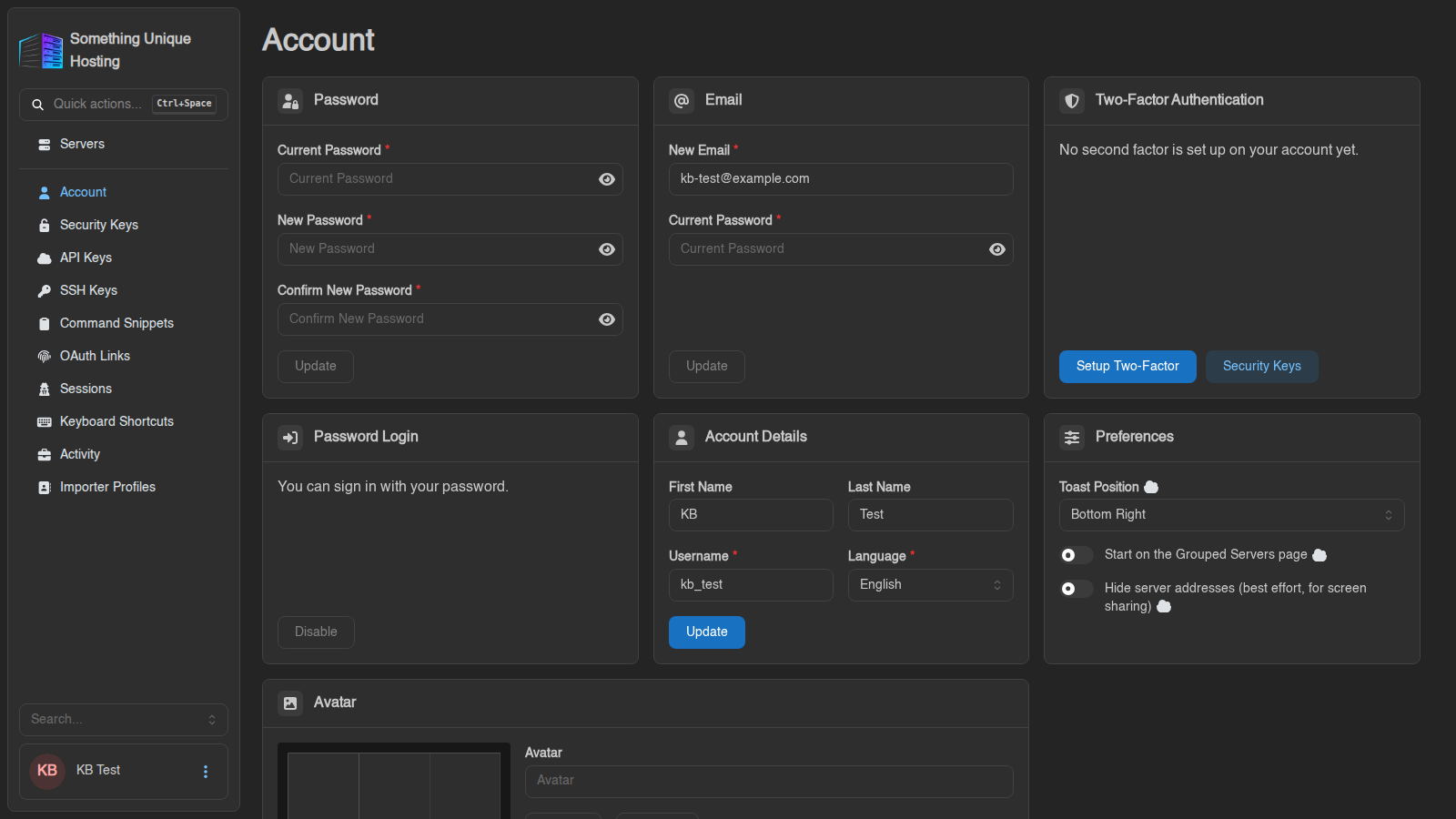
Click your **name** in the bottom-left corner of the panel. The **Account**
page opens, with the other account pages listed in the sidebar (Security Keys,
API Keys, SSH Keys and so on).
[](https://knowledgebase.suhosting.net/uploads/images/gallery/2026-10/acct-page-account.png)
## Signing in
Your game panel account is created automatically when you order a server. You
can sign in with:
- **Login with Paymenter**: one click, using your billing account.
- **Username or email** and your panel password.
- **Sign in with a Passkey**, once you've added one. See [Two-factor authentication and security keys](https://knowledgebase.suhosting.net/books/game-panel/page/two-factor-authentication-and-security-keys).
## Changing your password
In the **Password** card, enter your **Current Password**, then the **New
Password** twice (at least 8 characters), and click **Update**.
The panel then asks whether to **log out every other session**. Say yes if you
changed your password because you think someone else knows it.
Your panel password is also your SFTP password, so update your SFTP program too.
## Forgot your password?
1. On the login page, click **Forgot Password** (under the username box).
2. Enter your email address and click **Request Password Reset**.
3. Open the email and follow the link. Enter your new password twice and click **Reset Password**.
No email? Check your spam folder, and make sure you used the address on your
account. Still stuck? Open a ticket.
## Changing your email
In the **Email** card, enter the **New Email** and your **Current Password**,
then click **Update**. If a confirmation is needed, the panel says
*"Confirmation link sent to …"*. Your address changes once you click the link
in that email.
## Account details
**First Name**, **Last Name**, **Username** and **Language**. Click **Update**
to save.
Changing your Username also changes your SFTP username (username.serverid), so update your SFTP program afterwards.
## Preferences
- **Toast Position**: where pop-up notifications appear on screen.
- **Start on the Grouped Servers page**: open your server groups instead of the full list after login.
- **Hide server addresses**: blurs IPs and ports. Handy when streaming or sharing your screen.
## Avatar
Upload a picture in the **Avatar** card and click **Update**, or **Remove** to
go back to your initials.
## Other account pages
| Page | What it's for | Guide |
|---|---|---|
| **Security Keys** | Passkeys and hardware keys | [Two-factor & security keys](https://knowledgebase.suhosting.net/books/game-panel/page/two-factor-authentication-and-security-keys) |
| **API Keys** / **Sessions** / **SSH Keys** | Apps, logged-in devices, SFTP keys | [Sessions, API keys and SSH keys](https://knowledgebase.suhosting.net/books/game-panel/page/sessions-api-keys-and-ssh-keys) |
| **Command Snippets** / **Keyboard Shortcuts** | Time-savers | [Command snippets and shortcuts](https://knowledgebase.suhosting.net/books/game-panel/page/command-snippets-and-keyboard-shortcuts) |
| **OAuth Links** | Shows that your account is linked to Paymenter | |
| **Activity** | Everything done with your account: logins, changes, API use | |
| **Importer Profiles** | Saved connections for the [Importer](https://knowledgebase.suhosting.net/books/game-panel/page/moving-your-server-from-another-host-importer) | |