Your account: password, email and preferences
Getting to your account settings
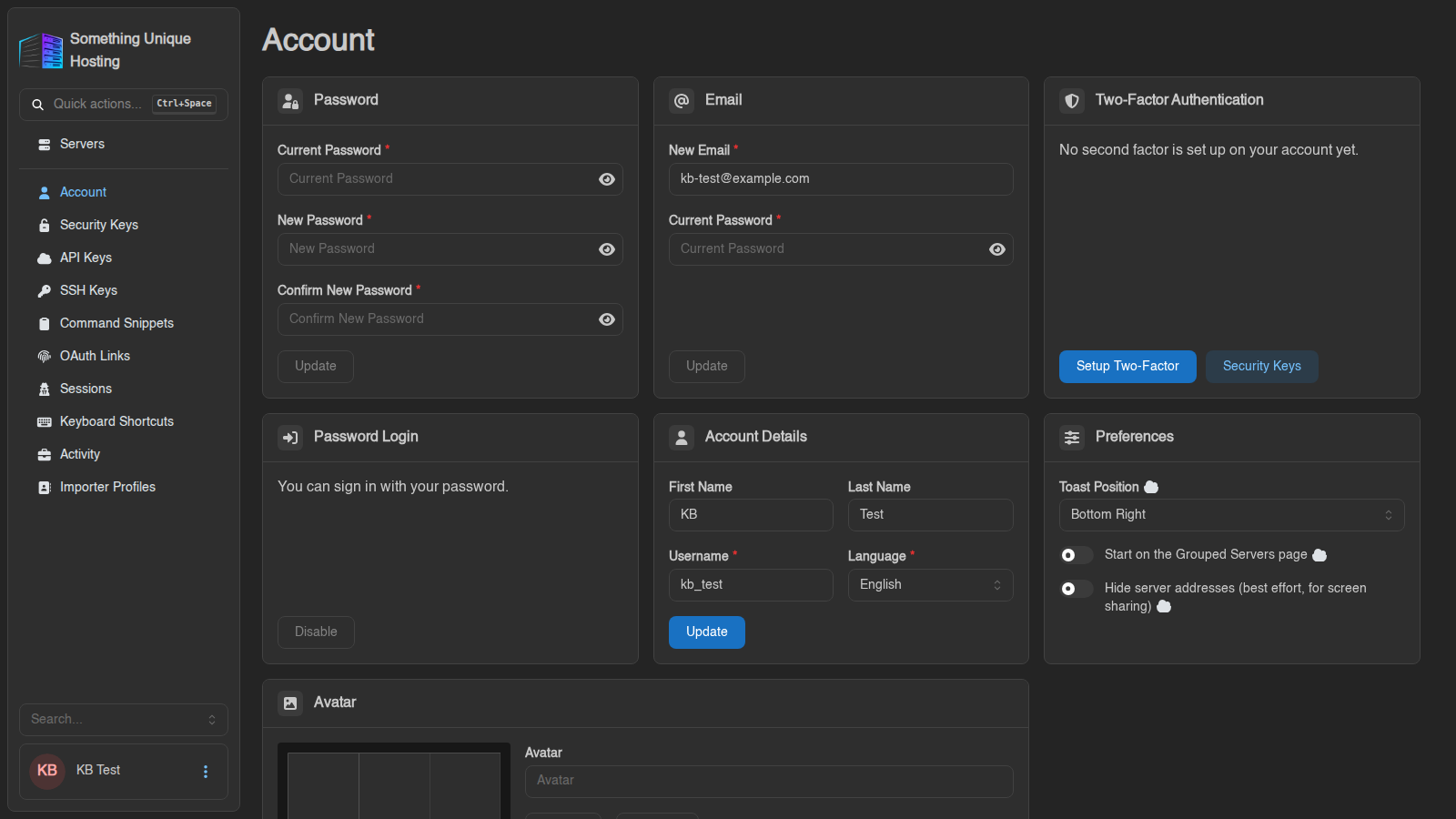
Click your name in the bottom-left corner of the panel. The Account page opens, with the other account pages listed in the sidebar (Security Keys, API Keys, SSH Keys and so on).
Signing in
Your game panel account is created automatically when you order a server. You can sign in with:
- Login with Paymenter: one click, using your billing account.
- Username or email and your panel password.
- Sign in with a Passkey, once you've added one. See Two-factor authentication and security keys.
Changing your password
In the Password card, enter your Current Password, then the New Password twice (at least 8 characters), and click Update.
The panel then asks whether to log out every other session. Say yes if you changed your password because you think someone else knows it.
Your panel password is also your SFTP password, so update your SFTP program too.
Forgot your password?
- On the login page, click Forgot Password (under the username box).
- Enter your email address and click Request Password Reset.
- Open the email and follow the link. Enter your new password twice and click Reset Password.
No email? Check your spam folder, and make sure you used the address on your account. Still stuck? Open a ticket.
Changing your email
In the Email card, enter the New Email and your Current Password, then click Update. If a confirmation is needed, the panel says "Confirmation link sent to …". Your address changes once you click the link in that email.
Account details
First Name, Last Name, Username and Language. Click Update to save.
Changing your Username also changes your SFTP username (username.serverid), so update your SFTP program afterwards.
Preferences
- Toast Position: where pop-up notifications appear on screen.
- Start on the Grouped Servers page: open your server groups instead of the full list after login.
- Hide server addresses: blurs IPs and ports. Handy when streaming or sharing your screen.
Avatar
Upload a picture in the Avatar card and click Update, or Remove to go back to your initials.
Other account pages
| Page | What it's for | Guide |
|---|---|---|
| Security Keys | Passkeys and hardware keys | Two-factor & security keys |
| API Keys / Sessions / SSH Keys | Apps, logged-in devices, SFTP keys | Sessions, API keys and SSH keys |
| Command Snippets / Keyboard Shortcuts | Time-savers | Command snippets and shortcuts |
| OAuth Links | Shows that your account is linked to Paymenter | |
| Activity | Everything done with your account: logins, changes, API use | |
| Importer Profiles | Saved connections for the Importer |