Things done to your server (starting it, editing files, backups, console commands) are not on this page. They are in the server's own Activity tab.
## Finding the pages 1. Click your **name** in the bottom-left corner of the panel. 2. In the sidebar, click **Activity** or **OAuth Links**. ## Your account activity [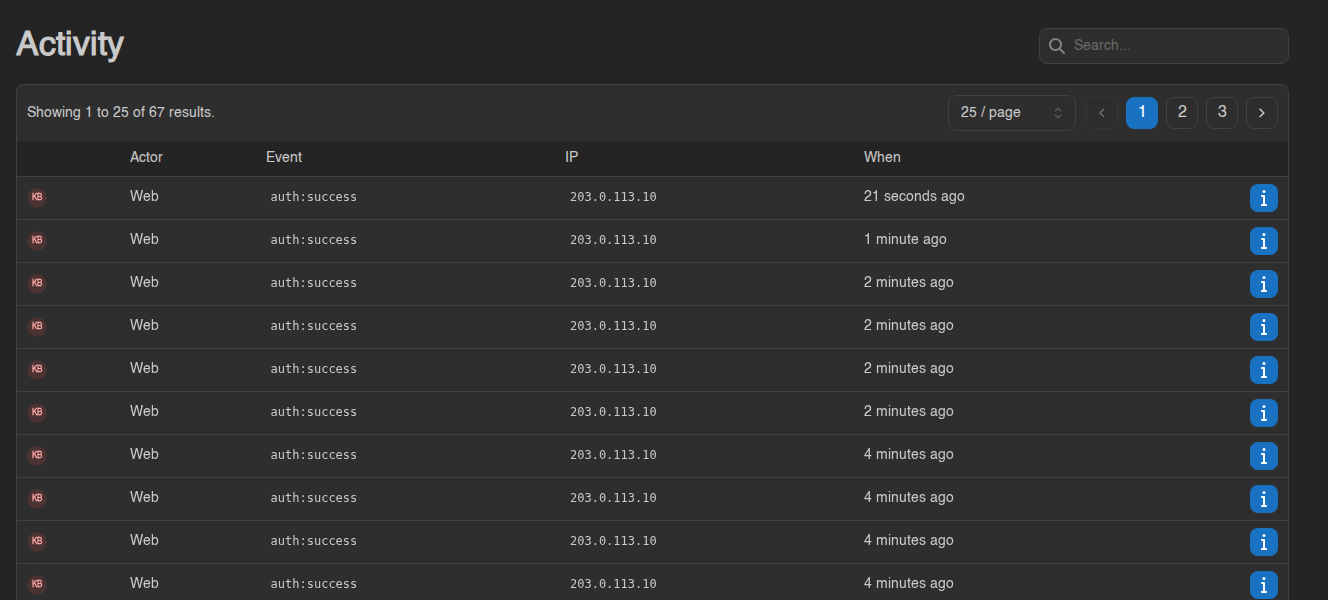](https://knowledgebase.suhosting.net/uploads/images/gallery/2026-11/acct-activity.png) Newest events are at the top. | Column | Meaning | |---|---| | **Actor** | How it was done: **Web** (a browser) or **API** (an API key). If a member of our staff did something on your account while helping you with a ticket, it says *Impersonated by …* with their name. | | **Event** | What happened (see the list below) | | **IP** | The internet address it came from | | **When** | How long ago. Hover for the exact time. | Click the **ⓘ** button on a row to see the details, for example which browser was used. [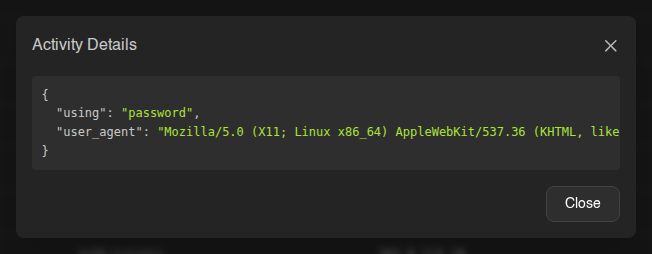](https://knowledgebase.suhosting.net/uploads/images/gallery/2026-11/acct-activity-details.png) ### What the events mean | Event | Means | |---|---| | `auth:success` | You signed in. The details show how: `password`, `oauth2` (Login with Billing), a passkey or security key, a 2FA code or a recovery code. | | `auth:checkpoint` | Your password was accepted and the panel is waiting for your two-factor code. | | `auth:reset-password` | A new password was set through **Forgot Password**. | | `account:password-changed` | Your password was changed on the Account page. | | `account:email-change-requested`, `account:email-changed` | An email change was requested, then confirmed. | | `account:update`, `account:update-avatar`, `account:delete-avatar` | Account details, preferences or avatar changed. | | `account:two-factor.enable`, `account:two-factor.disable` | Two-factor authentication turned on or off (`…two-factor.email…` for email codes). | | `security-key:create`, `security-key:delete` | A passkey or security key was added or removed. | | `session:delete`, `session:delete-all` | You removed a logged-in device, or used **Log Out Others**. | | `api-key:create`, `api-key:delete`, `api-key:recreate` | API keys made, removed or recreated. | | `ssh-key:create`, `ssh-key:import`, `ssh-key:delete` | SSH keys for SFTP. | | `user:command-snippet.create`, `…update`, `…delete` | Command snippets. | | `account:oauth-links.create`, `oauth-link:delete` | A linked login was added or removed. | The **Search** box at the top matches event names. Type `auth` to see only logins, or `password` for everything to do with your password.The log only records logins that succeeded. Someone trying a wrong password does not show up here.
## Spotting a login you don't recognise Look at the `auth:success` rows. For each one ask: was that me? - **IP**: your own address changes when you switch between home, phone and a VPN, so one unfamiliar address is not proof of anything. A login from a country you have never been to is. - **When**: a login at 4 am while you were asleep is worth a closer look. - **ⓘ details**: the browser named there should be one you use. A login *using* `oauth2` means someone signed in through the billing site. If you think it wasn't you: 1. **Change your password** straight away on the [Account page](https://knowledgebase.suhosting.net/books/game-panel/page/your-account-password-email-and-preferences), and answer **Yes** when the panel offers to log out every other session. 2. Go to **Account → Sessions** and click **Log Out Others** if you haven't already. See [Sessions, API keys and SSH keys](https://knowledgebase.suhosting.net/books/game-panel/page/sessions-api-keys-and-ssh-keys). 3. Turn on **two-factor authentication**. See [Two-factor authentication and security keys](https://knowledgebase.suhosting.net/books/game-panel/page/two-factor-authentication-and-security-keys). 4. Check **Account → API Keys** and **SSH Keys** for anything you didn't create, and remove it. 5. Check the server's [Activity tab](https://knowledgebase.suhosting.net/books/game-panel/page/the-activity-log-who-did-what) to see whether anything was changed on your server.Anyone who can sign in to your billing account can also reach the panel with Login with Billing. If a login looks wrong, change your billing password too.
Still worried? Open a ticket on the billing site and tell us the time of the login you don't recognise. ## OAuth links: logins connected to your account An **OAuth link** connects your panel account to a login on another website, so that site can sign you in without a panel password. Your panel account is created by our billing site, and the **Billing** link is what the **Login with Billing** button on the login page uses. [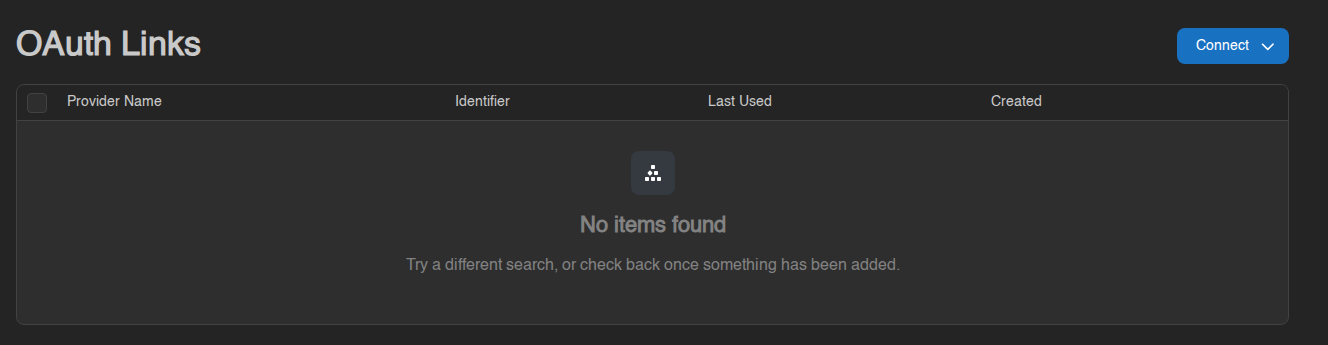](https://knowledgebase.suhosting.net/uploads/images/gallery/2026-11/acct-oauth-links.png) *This test account has no links yet. With a Billing link the table has one row.* | Column | Meaning | |---|---| | **Provider Name** | The site you are linked to (**Billing**) | | **Identifier** | Your account number on that site | | **Last Used** | When you last signed in through it (**N/A** if you only use your password) | | **Created** | When the link was made |The Billing link is normal and you should leave it alone. It cannot be removed: Remove is greyed out for it, and the panel refuses the request. Your password and passkeys still work with or without it.
**Connect** only lists providers you are allowed to manage yourself. At the moment there are none, so the menu is empty. If your account has no Billing link and **Login with Billing** does not work, open a ticket and we will connect it for you.