Troubleshooting
Fixes for common server problems.
My server won't start or keeps crashing
What this is about
Your server is stuck on Starting, goes straight back to Offline, or crashes after running for a while. This guide walks through the usual causes in the order we check them ourselves. Most problems can be fixed without opening a ticket.
Step 1: Read the console
Go to the Console tab and start the server. The answer is almost always in the last 20–30 lines before it stops.
Lines from the panel itself start with container@calagopus~. Everything else
comes from the game. Look for words like ERROR, Exception,
FATAL or Caused by.
When the server crashes, the panel prints a block like this:
container@calagopus~ ---------- Detected server process in a crashed state! ----------
container@calagopus~ Exit code: 137
container@calagopus~ Out of memory: true
The Out of memory line is the most useful clue. Jump to Out of memory below if it says true.
Step 2: Match what you see
"Out of memory: true" (or exit code 137)
Your server used all the RAM your plan allows and was stopped.
- Remove or disable heavy mods. Big modpacks need much more RAM than vanilla.
- Lower view/render distance in your game's server config.
- Pre-generate or trim your world if the game supports it. Huge explored worlds use more memory.
- If you've already trimmed what you can, your plan may be too small. See Upgrade/Downgrading Servers.
You can watch memory use live on the Console tab's resource graphs.
"Disk space is full, cannot start the server" / "Server is exceeding the assigned disk space limit"
You're out of storage. The server won't start until you free some up.
- Delete old logs, crash reports and exported backup archives in the Files tab.
- Archives you exported to files from the Backups tab count against your disk space, so delete them once you've downloaded them.
"Aborting automatic restart, last crash occurred less than … seconds ago"
The server crashed twice in quick succession, so the panel stopped restarting it to avoid a crash loop. Fix the underlying crash (the lines above this message), then start the server manually.
Stuck on "Starting" forever
The game process is running but the panel never saw the line that means ready.
- Scroll the console. Is it still loading (generating the world, downloading mods)? First starts and big modpacks can take several minutes.
- If the console is still printing new lines, wait it out.
- If nothing new has appeared for a few minutes, look for an error near the end, then Restart.
Starts, then stops after a few seconds with no clear error
Most often a broken config file or a bad mod.
- Think about what changed last: a mod, a config edit, a version update.
- Undo it: remove the mod, or restore the config from a backup (on ZFS nodes, Backups → ⋯ → Browse lets you grab a single file).
- If you edited a JSON config, check it for a missing comma or bracket. Pasting it into jsonlint.com will point to the exact line.
Vintage Story: the console often names the mod that failed. Remove it from the Mod Browser → Installed tab and try again. If the panel shows a Missing mod dependencies banner, install the listed mods first.
"Address already in use" / "Failed to bind to port"
Your game config is set to a port that isn't yours. Go to the Network tab to see your assigned ports, and make sure your game's config uses the primary one. Most games read it from the Startup tab automatically; remove any port you hard-coded in config files.
Server installed wrong or is badly broken
Settings → Reinstall Server re-runs the original setup.
Take a backup first. Reinstalling can delete or overwrite files. If you switch on "delete all files of this server", it wipes everything.
Step 3: The server crashes, but only sometimes
- Crashes restart on their own. After a crash the panel restarts your server automatically. It only gives up if it crashes again straight away (see the Aborting automatic restart message above).
- Check Auto-Start. Settings → Auto-Start controls what happens after we restart the machine your server runs on (for maintenance, for example). Unless Stopped (the default) brings it back up unless you'd stopped it yourself. Always brings it back regardless.
- Get notified. A schedule with a Crash trigger can send you a Discord message. See Schedules.
- Server hangs when stopping? Turn on Settings → Auto-Kill so a server that won't shut down cleanly gets force-stopped after a set number of seconds.
Step 4: Still stuck? Open a ticket
Include these so we can help quickly:
- Debug Information from the Settings tab: Node, Location and Server UUID. Click each field to copy it.
- What changed right before it broke (mod, update, config edit).
- The last 50 or so lines of the console around the crash. Copy them as text, or take a screenshot.
- Roughly when it started happening.
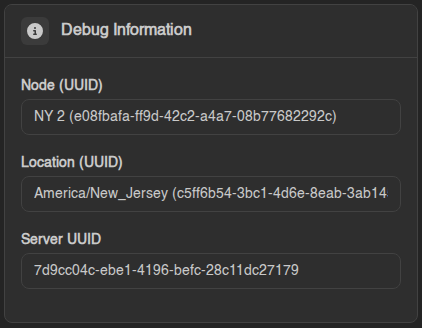
You don't need to send your password or any files. We can see your server from our side.